

5. Thermal convection with melting
Because of specific formulas for density and constant thermal properties of ice used in the study, the modules with rheology and material properties need to be modified in addition to the parameter file.
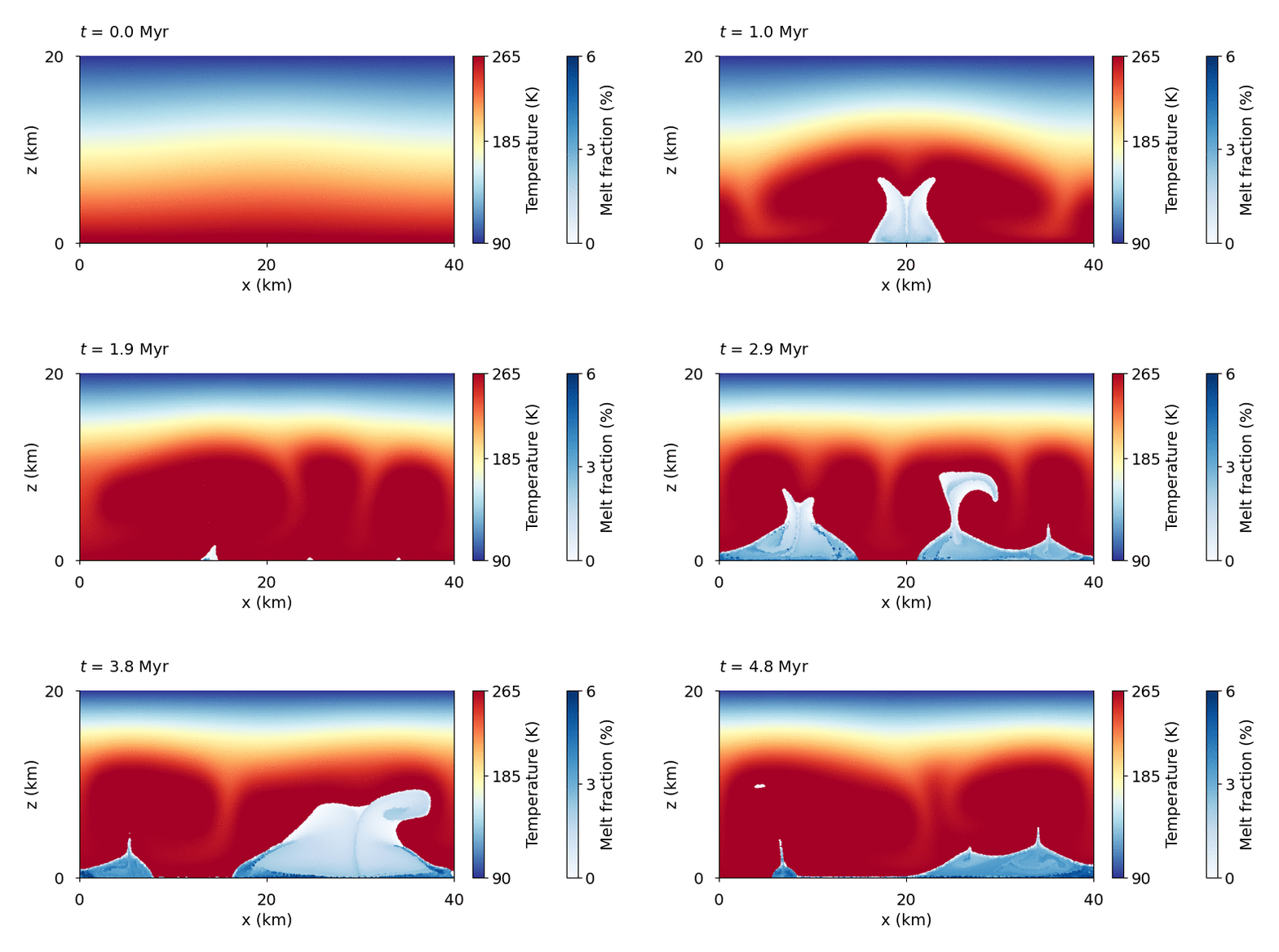
Tidally heated thermal convection in an ice shell inspired by the setup of Tobie et al. (2003) .
Download
Here you can download the bash scriptthe parameter file,
and the matplotlib script.
Detailed explanation is given below.
Attention
In this simulation, modification of the m_material_properties.py and m_rheology.py is needed.
Note
Copy the bash script, parameter file, and plotting script from /demos/demo5/ into the main directory.
Rheology file modification
Here we adopt the viscosity for the mixture of ice and melt from Tobie et al. (2003):
if (viscosity_type == "temp-dep"):
    # eta_v = 1.0/(1.0/(eta_0*exp(Q_activ/R_gas*(1.0/Temp - 1.0/T_ref))) + 1.0/eta_max)*exp(-45.0*xm)

    # --- Demo 5 ---
    T_bot = BC_heat_transfer[1][1]
    eta_v = eta_0*exp(-14.0*(Temp - T_bot)/170.0)*exp(-45.0*xm)
Material properties file modification
Here we adopt constant thermal properties from Tobie et al. (2003):
def k(Temp, composition):
    # k_H2O = 612.0/Temp

    # --- Demo 5 ---
    k_H2O = 2.3

    return k_H2O

def cp(Temp, composition):
    # cp_H2O = 185.0 + 7.037*Temp

    # --- Demo 5 ---
    cp_H2O = 2100

    return cp_H2O
Parameter file modification
We start with changing the directory name
# --- Name of the directory with results ---
name = "demo5_convection_melting"
As the melt generation and collapse will be rather quick, we make the output more frequent. We choose the time units millions of years and output every 25 kyr.
# --- In what units the time will be? ---
# 1.0 - seconds or nondimensional, or yr, kyr or Myr
time_units = Myr

# --- String representation of time_units ---
time_units_string = "Myr"

# --- Output method for Paraview, HDF5 and tracers ---
output_frequency = ["time", 25*kyr]
Mesh geometry
The computational domain will be 20 km thick and 40 km long. The mesh will be created during the inicialization, using crossed geometry of the elements. The basic elements will have the longest side of 1 km.
# --- Mesh height ---
height = 20e3 # m

# --- Mesh length ---
length = 40e3 # m

# --- Whether to read an external mesh ---
loading_mesh = False

# --- Mesh to be loaded ---
mesh_name   = ""

# --- Basic mesh resolution if not loading mesh ---
z_div = 50
# --- Number of nodes in horizontal direction ---
x_div = int(z_div*(length/height)) # (keeps aspect ratio 1)

# --- Method of dividing basic squares into mesh triangle elements. ---
triangle_types = "crossed" # crossed, left, right, left/right, right/left

# --- Rectangular mesh refinement ---
refinement = []
Tracers will be used for partial melt, we will save them in order to visualize them later.
However, both tracers_output and tracers_header can remain empty, as m_check.py fills
them automatically.
# --- What properties to save? Must be one of the following (order does not matter):
tracers_output = []

# --- Headers for the columns in the text file for tracers
tracers_header = []
To visualize the results in Paraview, we will save temperature, melt fraction, and viscosity. For initial condition, we will save only temperature.
# --- What functions to write into Paraview and HDF5 file ---
paraview_output = ["temperature", "melt_fraction", "viscosity"]

paraview_output_ini = ["temperature"]
Heat transfer settings
We also increase the temperature at the bottom of the ice shell.
BC_heat_transfer   = [["temp", 90.0],      # top boundary    (1)
                      ["temp", 270.0],     # bottom boundary (2)
                      ["heat_flux", 0.0],  # left boundary   (3)
                      ["heat_flux", 0.0]]  # right boundary  (4)
In order to trigger melting, we turn on the tidal heating and specify its properties
# --- Tidal heating ---
tidal_dissipation           = True

initial_tidal_dissipation   = False
heating_model               = "Maxwell" # Maxwell, Andrade or none
H_max = 4e-6 # W m^{-3}