

6. Tectonic extension
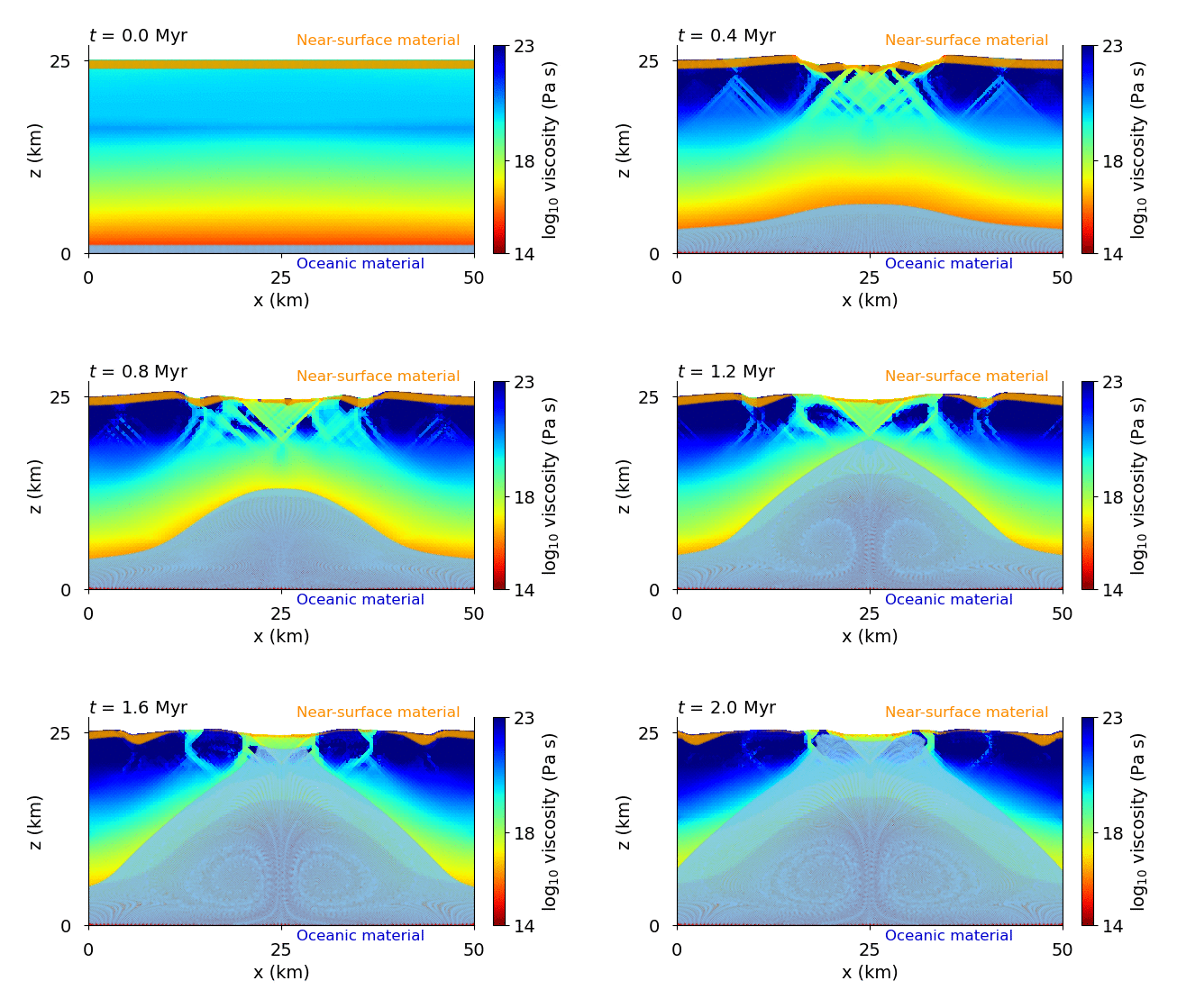
Tectonic extension of Europa’s ice shell following the setup by Howell and Pappalardo (2018) .
Download
Here you can download the bash scriptthe parameter file,
and the matplotlib script.
Detailed explanation is given below.
Note
Copy the bash script, parameter file, and plotting script from /demos/demo6/ into the main directory.
Files settings
We start with the directory name
# --- Name of the directory with results ---
name = "demo6_extension"
The directory protection will be turned off, meaning that when lauched repeatedly, the results will be overwritten each time
# Protection from overwriting the directory above
protect_directory = False
We will start the simulation from scratch, therefore reloading will be turned off.
The reload_name, reload_step, and restart_time parameters are now inactive.
# --- Whether or not to load HDF5 data from reload_name/HDF5/data.h5 ---
reload              = False

# --- Name of the directory from which the data will be reloaded ---
reload_name                 = ""

# ---  Time stamp of the HDF5 file which will be loaded ---
reload_step                 = 10
Time settings
We choose the time units to millions of years (time_units_string).
The simulation will run for 2 Myr (termination_condition) and
an output will be made every 10 kyr (output_frequency).
# --- In what units the time will be? ---
# 1.0 - seconds or nondimensional, or yr, kyr or Myr
# --- String representation of time_units ---
time_units_string = "Myr"

# --- Criterion for ending the simulation, e.g., ["time", 1*Myr], ["step", 1000], ["time_and_step", 100*kyr, 1000] or ["initial_condition", *]---
termination_condition = ["time", 2*Myr]

# --- Output method for Paraview, HDF5 and tracers ---
output_frequency = ["time", 10*kyr]
The simulation requires tracers because of elasticity, plasticity, and tracking of passive compositional fields.
The tracers_output and tracers_header will remain empty, but they will be filled automatically.
# --- What properties to save? Must be one of the following (order does not matter):
tracers_output = [] # KEEP EMPTY, will be filled automatically

# --- Headers for the columns in the text file for tracers
tracers_header = [] # KEEP EMPTY, will be filled automatically
To visualize the results in Paraview, we will save temperature, velocity, and viscosity and other useful functions. For initial condition, we will save only temperature.
# --- What functions to write into Paraview and HDF5 file ---
paraview_output = ["temperature", "velocity", "viscosity", "plastic_strain", "composition_1", "composition_2", "density"]

paraview_output_ini = ["temperature"]
To the statistics text file, the heat flux through the top boundary, time (in the units specified above, i.e., Myr) and the duration of the time step will be saved. We also choose corresponding headers.
# --- What values to print in a text file every time step? ---
stat_output = ["time", "timestep"]

# --- Headers for the columns in the text file
stat_header = ["Time (h)", "dt (s)"]
Mesh settings
The computational domain will be 25 km thick and 50 km long. The mesh will be created during the inicialization, using crossed geometry of the elements. The basic elements will have the longest side of 2 km and the mesh will not be refined.
# --- Mesh height ---
height = 25e3 # m

# --- Mesh length ---
length = 50e3 # m

# --- Whether to read an external mesh ---
loading_mesh = False

# --- Mesh to be loaded ---
mesh_name   = ""

# --- Basic mesh resolution if not loading mesh ---
z_div = 50

# --- Number of nodes in horizontal direction ---
x_div = int(z_div*(length/height)) # (keeps aspect ratio 1)

# --- Method of dividing basic squares into mesh triangle elements. ---
triangle_types = "crossed" # crossed, left, right, left/right, right/left

# --- Rectangular mesh refinement ---
refinement = []

# --- Initial topography ---
initial_topography = False

# --- Initial top topography ---
h_top_ini = Expression("0.0", l = length, pi = np.pi, degree = 1)

# --- Initial bottom topography ---
h_top_ini = Expression("0.0", l = length, pi = np.pi, degree = 1)
Material composition
Rheologically, the ice shell will consist of pure ice, but we want to track the movement of the near-surface
layer and an oceanic layer. We define them in the materials as follows:
materials = [["rectangle", 0, length, 0, height], ["rectangle", 0, length, 0, 1e3], ["rectangle", 0, length, height - 1e3, height]]

empty_cells_allowed = False

empty_cells_composition = 0

empty_cells_region = []
Stokes problem settings
For the discretization of the velocity, we choose Mini elements The time step will be constant, set to 1 kyr. Since the rheology will be non-Newtonianwe specify the number of Picard iterations.
stokes_elements = "Mini"

time_step_position = "stokes" #stokes (right after Stokes problem) or "end" (at the end of the time loop)

time_step_strategy = "constant"

dt_const = 1.0*kyr

maximum_time_step = False
dt_max = 0.1*Myr

scaled_time_step = False
time_step_scaling = 25 # dt = t / time_step_scaling

# --- The CFL parameter ---
cfl = 0.5

# ---  Maximum number of Stokes solver Picard iterations ---
Picard_iter_max     = 25

# --- Minimum relative error in velocity field ---
Picard_iter_error   = 1e-3

error_type          = "integrated" # "maximum or integrated"
For the boundary conditions we prescribe free surface at the top boundary. On the left and right boundaries we prescribe diverging velocities of 10 km/Myr, and at the bottom boundary an influx that compensates the outflux through the lateral boundaries.
# Boundary conditions for velocity (free_slip, no_slip, free surface, velocity, velocity_x, velocity_y)
BC_Stokes_problem = [["free_surface"],                # top boundary       (1)
                    ["velocity", 0.0, 10e3/Myr],    # bottom boundary    (2)
                    ["velocity_x", -10e3/Myr],       # left boundary      (3)
                    ["velocity_x", 10e3/Myr]]       # right boundary

mesh_displacement_laplace = "full"  #"full_laplace" or "z_only"

# Method for correcting velocity field in case of multiple free surface conditions
stokes_null = "boundary"

integration_method = "RK2" # Euler, RK2, RK4

tracers_per_cell = 20

weight_tracers_by_ratio = False
Heat transfer settings
Since we solve thermal convection, the heat transfer equation needs to be solved. The nonlinearity is rather weak (\(k\) and \(c_p\)) are temperature dependent, therefore linear solver can be used. At the surface and ice-water boudnary, we prescribe temperature, while the lateral boundaries are adiabatic. The reference temperature is set to 265 K. Parameters related to radiative boundary condition will not be used.
# --- Solve heat transfer? ---
solve_energy_problem = True

# --- Whether the heat transfer should be solved with nonlinear solver ---
nonlinear_heat_equation = False

# --- Boundary condition for heat transfer equation ---
BC_heat_transfer   = [["temp", 100.0],     # top boundary    (1)
                    ["temp", 270.0],     # bottom boundary (2)
                    ["heat_flux", 0.0],  # left boundary   (3)
                    ["heat_flux", 0.0]]  # right boundary  (4)

# --- Reference temperature ---
T_ref       = 273.0 # K

# --- Insolation parametes ---
emis        = 0.97          # Ice emissivity
albedo      = 0.67
dist_AU = 5.2                       # Object's distance from Sun in AU
insolation = insol_1AU/dist_AU**2
The melting is not expected to occur in this simulation. However, we turn on the tidal dissipation. As an initial condition, a conductive profile will be solved and perturbed by a cosine wave.
# --- Melting inside the shell ---
# --- Whether generate partial melt if the temperature of the solid reaches T_melt ---
internal_melting = False

# --- Melting temperature of the solid ---
T_melt = 270.0      # K

# --- Tidal heating ---
tidal_dissipation           = True

initial_tidal_dissipation   = False
heating_model               = "Maxwell" # Maxwell, Andrade or none
H_max = 4e-6 # W m^{-3}

# Andrade parameters
alpha_and = 0.2

# --- Find conductive initial condition ---
init_cond_profile = True

# --- Cosine perturbation of initial temperature ---
cos_perturbation = True

# --- Thermal perturbation amplitude ---
perturb_ampl        = 1 # K

# --Number of half-cosine waves in lateral direction ---
perturb_freq        = 1
Rheology
To mimic Titan’s ice shell, we prescribe corresponding gravity and ice physical properties.
Since the density is directly given by a temperature-dependent formula
in m_material_properties.py, the thermal expansivity here is inactive.
# --- Gravity acceleratuin ---
g           = 1.3                           # m s^-2

# --- Density of the domain solid ---
rho_s       = 920.0 # kg/m3

# --- Density of the liquid below the domain ---
rho_l       = 1000.0 # kg/m3

# --- Density of the melt produced by the solid ---
rho_m       = rho_l # kg/m3
For the tectonic simulation, plasticity and elasticity need to be considered. Since there is a velocity boundary condition at the bottom boundary, the phase transition and its parameters are inactive. In case of extensional simulation, the adaptive smoothing can be turned off.
# --- Rheology ---
elasticity = True

plasticity = True

# --- Phase transition at the bottom boundary ----
phase_transition = True

# --- Strength of the phase transition at the ice-water boundary ---
DAL_factor  = 0.0 # W/m3

# --- Latent heat of the material ---
Lt                  = 334.0e3 # J/kg

# --- Adaptive topography diffusion and topography diffusion factor ---
adaptive_smoothing = False
topo_diff = 1e-8*time_scaling
The viscosity will be temperature- and stress- dependent, given by the rheological laws by Goldsby and Kohlstedt (2001). The chosen grain size should yield viscosity at the melting point about \(10^{14}\) Pa s. The upper and lower cut-off viscosities are set. We specify all plastic properties.
# --- VISCOSITY ---
viscosity_type = "GK_2001" # constant, temp-dep, GK_2001 (Goldsby and Kohlstedt, 2001) or composition

# --- Parameters for constant / temperature-dependent viscosity ---
eta_0 = 1e15        # Pa.s

# --- Activation energy ---
Q_activ = 60e3      # J/mol

# --- Grain size ---
d_grain = 1.0e-3

# --- Upper cut-off viscosity ---
eta_max = 1e23

# --- Lower cut-off value for plastic viscosity ---
eta_min_plast = eta_max/1e6
eta_min = 1e10

# # --- Elasticity ---
# If elasticity is off, we can compute the new viscosity directly from the strain rate (it will be faster)
# However, the stress formula + VEP iterations would work too
stress_iter_error = 1e-4

# --- Plasticity ---
# --- Angle of internal friction in degrees ---
int_friction_angle = 16.0

# --- Cohesion of an undamaged material ---
cohesion_strong = 1e6

# --- Cohesion of a fully damaged material ---
cohesion_weak = 0.0

yield_stress_max, yield_stress_min = 1e8, 0.1

# --- Value of the plastic strain at which the material starts to accumulate damage ---
eps_strong = 0

# --- Critical value of the plastic strain beyond which the material is considered as fully damaged ---
eps_weak = 0.2

# --- Whether the accumulated plastic strain decreases in time ---
healing = False

# --- Characteristic time scale for the microscopic healing processes ---
healing_timescale = 300*kyr
Plotting
In the script plot_demo6.py, we will plot the evolution of the viscosity field from the simulation
together with the near-surface and oceanic materials, and make an animation. Here, the oceanic material is commented
for clarity of the animation. Instead of plotting the axes, we plot a single scalebar in the right bottom corner.
name = "demo_extension"

skip_plotting = False

plot_streamlines = False

plot_comp_tracers = [[2, "orange", 0.25]] #[1, "lightskyblue", 0.25],

plot_melt_tracers = False

show_time = True

plot_scalebar = True

plot_axes = False

i_start = 0
Next, the properties for the axes and color bars are set.
if (skip_plotting == False):
    font_size = 14

    x_label = ["0", "100", "200"]
    x_label_val = [0, 100e3, 200e3]
    x_label_text = "x (km)"

    z_label = ["0", "100"]
    z_label_val = [0, 100e3]
    z_label_text = "z (km)"

    # --- Values for temperature color bar ---
    # c_label = ["90", "185", "265"]
    # c_label_val = [90, 185, 265]
    # c_label_text = "Temperature (K)"

    # --- Values for viscosity color bar ---
    c_label = ["14", "18", "23"]
    c_label_val = [14, 18, 23]
    c_label_text = r"log$_{10}$ viscosity (Pa s)"

    # --- Values for melt fraction color bar ---
    m_label = ["0", "3", "6"]
    m_label_val = [0, 3e-2, 6e-2]
    m_label_text = "Melt fraction (%)"

    .
    .
    .
Later, in this part, FEniCS functions are read - this time we only need viscosity. On the next lines, we define its decadic logarithm.
# ---- In each time step, initialize mesh, funciton spaces and functions ---
# (necessary when the mesh changes shape)
mesh, sCG2, vCG1, sDG0 = initialize(name, hdf5_step)

visc = Function(sDG0)
visc_log = Function(sDG0)

visc  = load(name, hdf5_step,
                "viscosity", visc
                )

visc_log.assign(project(ln(visc)/ln(10), sDG0))

if (plot_scalebar == True):
    scalebar(ax, 50e3, 0, font_size)
.
.
.
And later in the loop, we plot the label for the near surface material
ax.text(27e3, 27e3, "Near-surface material", color = 'darkorange', fontsize=font_size-2)